
ProfitSource – Drawing Tools
This month’s article is about some of the Drawing Tools at our disposal in ProfitSource. In particular, I will focus on those required to do our Price Forecasting. Here is a summary:
To apply a Highs Resistance Card to our chart we will use the Gann Retracement Tool.
To apply a Ranges Resistance Card to our chart we also use the Gann Retracement Tool.
For a Repeating Range we use the ABC Pressure Points Tool.
To apply a Lows Resistance Card to our chart we use the Preset Gann Square.
Primarily these drawing tools are accessed via ProfitSource’s Drawing Tool box. To access this, with any price chart already open in ProfitSource, click on the Drawing Tools icon in the tool bar above the chart, or you can access it via the “Page Monitor” (View -> Page Monitor) on the right-hand side of the screen.
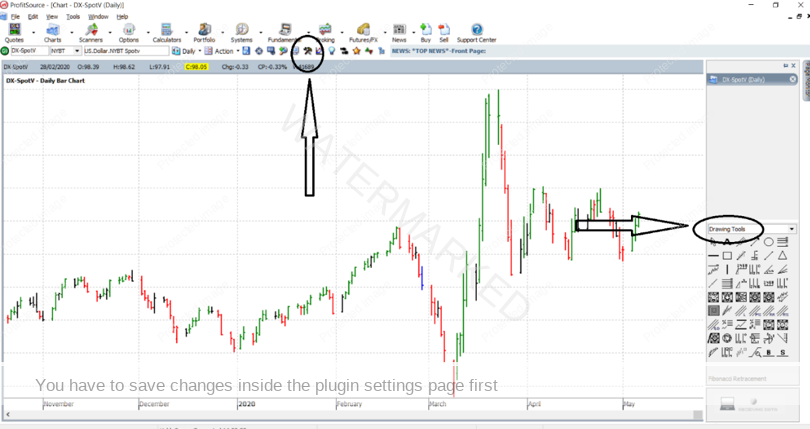
Once you have it open, here is what the Drawing Tools box looks like. And I’ve drawn attention to the “Gann” tab – this is the one which has the first of our tools.
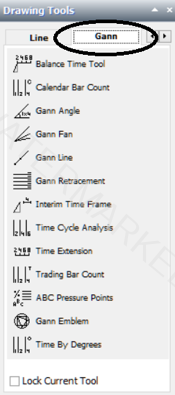
And now for more detail…
To apply a Highs Resistance Card to your chart, select the Gann Retracement Tool:

For a detailed example of how to apply this tool to your chart, go to
ProfitSource – Chart Re-Creation Exercises
To apply a Ranges Resistance Card to your chart, you would also select the Gann Retracement Drawing Tool. For a detailed example on how to do this, go to:
ProfitSource – Chart Re-Creation Exercises Part Two – Creating a Ranges Resistance Card
To apply a Repeating Range to your chart, select the ABC Pressure Points Tool:

For a detailed example of how to apply this tool to your chart, go to:
ProfitSource – Chart Re-Creation Exercises – Part Three
To apply a Lows Resistance Card to your chart, first go to the Gann 2 tab of the Drawing Tools box – you may first need to use one of the two small arrows at the top of the Drawing Tools box to do this. Then select the Preset Gann Square drawing tool.
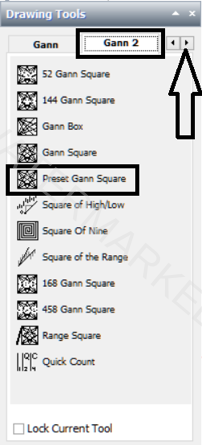
For a more detailed example of how to apply this tool to your chart, go to:
ProfitSource – Chart Re-Creation Exercises – Part Four – Lows Resistance Cards in ProfitSource
Work hard, work smart!
Andrew Baraniak